
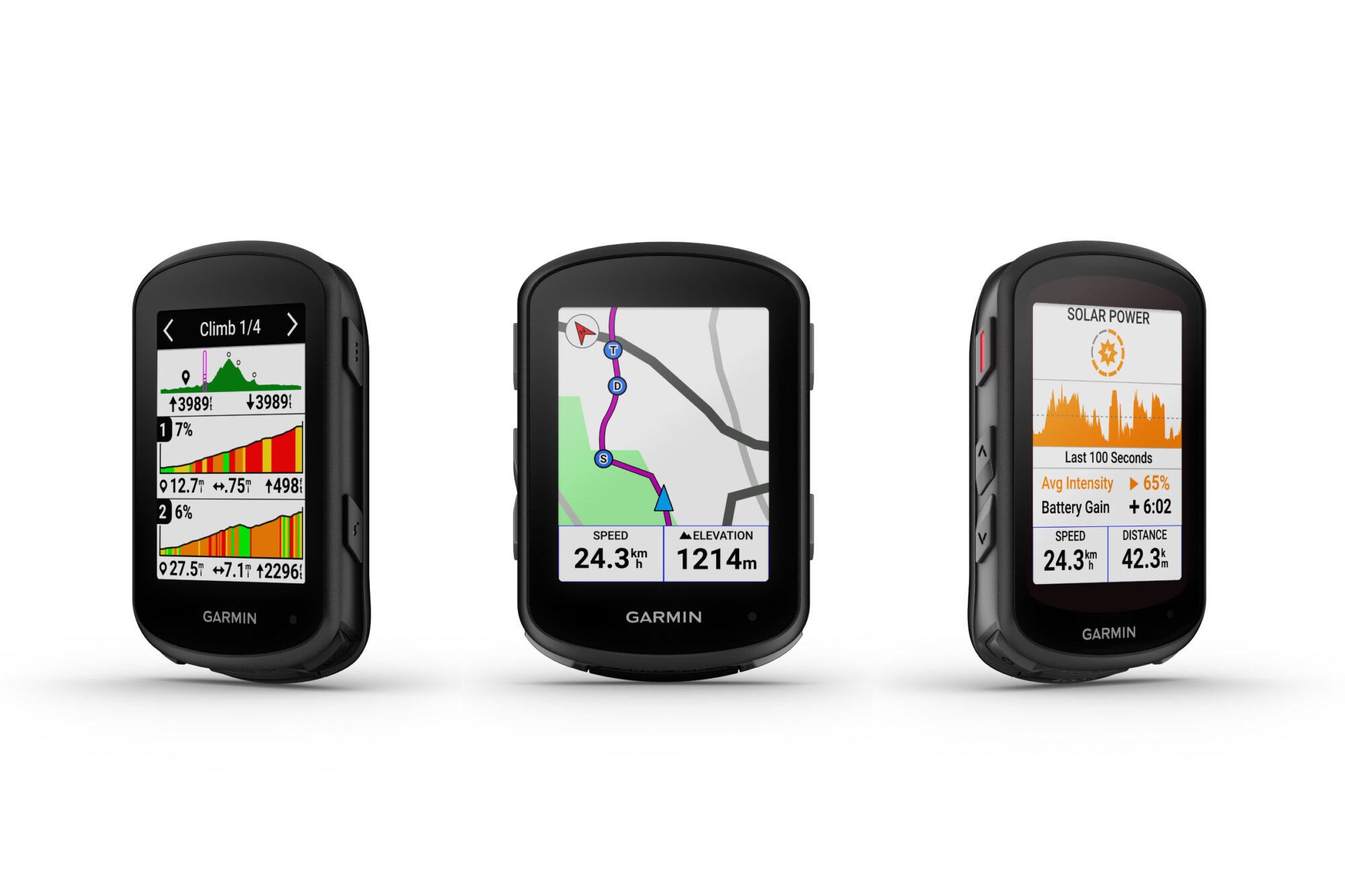
A good bike computer deal does not matter much if the device becomes annoying after the first month. That is why the Garmin Edge 540 deserves more attention than a normal weekend discount. For many U.S. riders watching a cycling computer bundle, the real question is not only whether the price is low. It is whether the bundle saves money on gear you would have bought anyway, like sensors, mounts, and training tools. Riders tracking product drops through consumer deal coverage are seeing the same pattern: older premium cycling tech often becomes the smarter buy when the newer model adds polish but not much daily value. Recent deal coverage has shown the Edge 540 marked down to $250 for Prime Day, a 29% cut from its standard price, while official Garmin specs list up to 26 hours of battery life for the standard model. That mix makes this more than another bike computer sale. It makes it a practical opening for road riders, gravel cyclists, and fitness-focused commuters who want strong GPS data without paying for features they may never touch.
Why the Garmin Edge 540 Bundle Price Feels Different This Time
A price drop on a head unit can look tempting, but a bundle drop changes the math. You are not only buying a screen for your handlebars. You are buying into a setup that can measure speed, cadence, heart rate, routes, climbs, workouts, and ride history with less piecing together afterward.
The discount matters because the extras are not throwaways
Many riders make the same mistake with bike tech. They buy the computer first, then realize the “cheap” purchase is not finished. A cadence sensor comes later. Then a heart rate strap. Then a better mount. By the end, the cart looks nothing like the first price that caught their eye.
That is where a cycling computer bundle can make sense. The value is not only in the sticker drop. It is in avoiding three or four separate purchases that each bring shipping, tax, and second-guessing.
A rider in Denver training for a summer century is a good example. The head unit alone can track the route. Add cadence and heart rate, and the same ride becomes more useful. You can see when you spun too hard on false flats, when your heart rate drifted late, and why your last 20 miles felt heavy.
The non-obvious part is that sensors can matter more for casual riders than racers. A racer may already own half this gear. A newer cyclist may not. For that person, the bundle can turn a GPS bike computer from a nice screen into a training habit.
The newer model is not always the better deal
New cycling tech creates pressure. Nobody wants to buy something that feels old on day one. Still, bike computers age differently than phones. If a unit has good GPS, stable buttons, clear mapping, and long battery life, it can stay useful for years.
That is why this bike computer sale is getting attention. Bicycling recently argued that the Edge 540 can still be the smarter buy than the newer Edge 550 for many riders, partly because the older unit keeps strong battery life and costs less during the sale window.
That matters on U.S. rides where distance and conditions vary. A 40-mile loop in Austin is not the same as a cool 40-mile loop in Vermont. Heat, reroutes, phone pairing, backlight use, and long coffee stops all change how a device feels in real life.
Here is the small truth riders learn late: the best cycling computer is often the one you stop thinking about. It wakes up, records cleanly, shows the next turn, survives rain, and gets home with battery left. Fancy screens are nice. Trust is nicer.
What Riders Actually Get Beyond a Lower Price
The appeal here is not a single feature. It is the way the unit handles the messy middle of a ride. That includes missed turns, rolling hills, bad weather, tired legs, and the small data points that help you ride better next week.
Battery life changes how you plan long rides
Garmin’s own manual lists up to 26 hours of battery life for the standard Edge 540 and up to 32 hours for the solar version under stated solar conditions. It also lists an IPX7 water rating, which means the device is built to handle incidental exposure to water under the rating’s limits.
That number is not only for ultra-distance riders. Battery confidence changes normal Saturday riding too. You can start at 7 a.m., stop for breakfast, wander onto a gravel connector, miss a turn, and still not treat the unit like a phone at 9%.
For U.S. riders, that matters because weekend routes often stretch out. A suburban rider outside Chicago may begin with a two-hour plan and turn it into a lakefront detour. A gravel rider in Kansas may spend more time fighting wind than expected. A strong battery gives the ride more room to breathe.
The counterintuitive point is simple. Longer battery life helps shorter rides too. It means fewer charges, fewer forgotten cables, and fewer mornings where you walk into the garage and see a dead screen.
Buttons still make sense on rough roads
Touchscreens look better in ads. Buttons often work better when your hands are sweaty, gloved, cold, or bouncing over broken pavement. That is not nostalgia. It is a practical advantage.
On chip-seal roads in Texas or winter shoulder rides in Pennsylvania, tapping a small screen can become a tiny fight. Buttons give you a fixed action. You know where your thumb goes without staring down for long.
That does not mean everyone should avoid touchscreens. Some riders love them for map browsing and quick page changes. But a GPS bike computer mounted on a vibrating handlebar has a different job than a phone on a couch.
This is why the Edge 540 still fits a wide audience. It may not feel flashy in the store. On the road, boring can become a strength. A device that responds the same way in rain, heat, and gloves is not old-fashioned. It is built for the way cyclists actually ride.
How the Edge 540 Helps Training Without Overwhelming the Ride
Good training tech should make the ride clearer, not heavier. Many riders do not need another screen yelling at them. They need better timing, better pacing, and a way to understand effort without turning every outing into homework.
Climb data can save your legs before the hard part
Garmin’s ClimbPro feature shows upcoming climbs, including where they appear, average gradient, and total ascent, with climb categories based on length and gradient. The manual also explains that the ClimbPro screen can appear automatically at the start of a climb.
That sounds like a race feature, but it helps normal riders too. Think about a cyclist on the Blue Ridge Parkway who burns too many matches on the first ramp because the road looks harmless. If the head unit shows the climb is longer than it appears, the rider has a reason to back off early.
That is the best kind of data. It changes behavior at the right moment.
The non-obvious insight is that climb tools are not only for climbing faster. They help you avoid panic. When you know a hill has two hard pitches and a flat middle, you stop treating every steep turn like the end of the world.
Data works best when it answers one clear question
A modern cycling computer can show more fields than most riders need. Speed, grade, power, cadence, heart rate, distance, time, temperature, elevation, training load, navigation prompts, and alerts can all fight for space.
The smart move is to build screens around questions. On a weekday training ride, you may need heart rate, cadence, lap time, and distance. On a new route, you may need map, next turn, grade, and remaining distance. On a recovery spin, you may need less data, not more.
A bike computer buying tips page should make this clear: the device is only useful if the rider knows what to ignore. More numbers do not mean better riding.
A rider in Phoenix heading out before sunrise may care most about time, hydration stops, and keeping effort under control before the heat builds. A rider in Portland may care more about navigation through neighborhood connectors and wet-road focus. Same computer. Different screen logic.
That is where the Edge 540’s value becomes more grounded. It gives enough depth for serious training, but it does not force every rider to act like a pro. You can grow into it without needing to use every feature in week one.
Who Should Buy This Deal and Who Should Skip It
A low price can make people buy the wrong thing faster. The better question is not “Is this discounted?” It is “Will this solve the problem I have on the bike?” For some riders, yes. For others, no.
It fits riders who are ready to stop using a phone as a head unit
Phones are fine for occasional rides. They are not ideal as full-time cycling computers. Battery drain, glare, rain, mounts, notifications, and crash risk all make phones feel like a compromise once rides get longer.
A dedicated GPS bike computer keeps the phone in your pocket and the ride data on the bars. That alone can make the experience calmer. You are not checking a text when you meant to check a turn. You are not risking your main communication device on a rough descent.
This deal is especially appealing for riders moving from “I track rides sometimes” to “I want to train with some intention.” That could mean a first century, a charity ride, a local gravel event, or a weekly group ride where getting dropped has started to sting.
The cycling computer bundle angle also helps first-time buyers because it reduces setup gaps. A head unit plus sensors can give a more complete picture from the start. That makes the first month more useful, which makes the habit more likely to stick.
It may not fit riders who want a touchscreen-first experience
Some riders should skip this and look higher in the lineup. If you love dragging maps around, searching locations directly from the unit, or swiping through screens like a phone, a button-led interface may feel stiff.
That is not a flaw. It is a fit issue.
A touchscreen model can make sense for riders who explore unfamiliar cities, change routes mid-ride, or spend time building courses from the device itself. If your riding style includes lots of on-the-fly navigation, you may be happier spending more.
There is also the “already equipped” rider. If you own a good head unit, heart rate strap, speed sensor, and cadence sensor, a bundle discount may not save you much. Buying duplicates because the sale looks strong is still waste.
A road cycling gear guide should frame this kind of purchase around gaps, not hype. If the deal fills a real gap, it is worth attention. If it adds another box to a drawer, leave it alone.
Conclusion
The smartest cycling purchases rarely feel dramatic. They solve small problems over and over until you forget what the old setup felt like. That is the appeal here. A strong bike computer sale can look like a simple discount, but the better story is how much friction it removes from daily riding.
The Garmin Edge 540 sits in that useful middle ground where the price is lower, the feature set is still strong, and the core ride experience has not aged out. It gives riders a cleaner way to track routes, effort, climbs, and progress without turning the handlebar into a tech demo.
That makes the current bundle attention easy to understand. For many American cyclists, the right buy is not the newest screen. It is the setup that helps them ride farther, pace better, and charge less often. Check the included sensors, compare the final cart price, and buy only if the bundle matches the way you ride.
Frequently Asked Questions
Is the Edge 540 bundle worth buying for beginner cyclists?
Yes, it can be worth it if you plan to ride often and want better data than a phone app gives. The bundle makes the most sense when it includes sensors you do not already own, especially cadence, speed, or heart rate gear.
How much battery life does the standard model offer?
Garmin lists up to 26 hours for the standard version, though real results depend on settings, sensors, backlight use, navigation, and weather. For most road, gravel, and fitness rides, that gives plenty of room between charges.
Is a button bike computer better than a touchscreen?
Buttons can be better for riders who wear gloves, ride rough roads, or want steady control in rain. Touchscreens feel easier for map browsing, but buttons often win when the bike is bouncing and your eyes need to stay up.
What should come in a cycling computer bundle?
A useful bundle may include the head unit, mount, charging cable, speed sensor, cadence sensor, and heart rate strap. The exact contents can vary by retailer, so check the box list before buying.
Can this bike computer replace a phone for navigation?
It can handle ride navigation, route prompts, and bike-focused data, but it should not fully replace your phone. Keep your phone for calls, photos, emergency contact, and backup maps when riding unfamiliar roads.
Is this a good choice for gravel riding?
Yes, it can fit gravel riders well because battery life, button control, mapping, and climb tools all matter off pavement. Pair it with planned routes and the right data screens for long mixed-surface rides.
Should I buy the head unit alone or the bundle?
Buy the head unit alone if you already own compatible sensors. Choose the bundle if you are building your setup from scratch and the included accessories cost less together than buying each item separately.
What is the best reason to upgrade from phone tracking?
The biggest reason is ride focus. A dedicated computer keeps navigation and training data visible while your phone stays protected. That means less battery stress, fewer distractions, and a cleaner setup on longer rides.